
Player

One player for video and music.

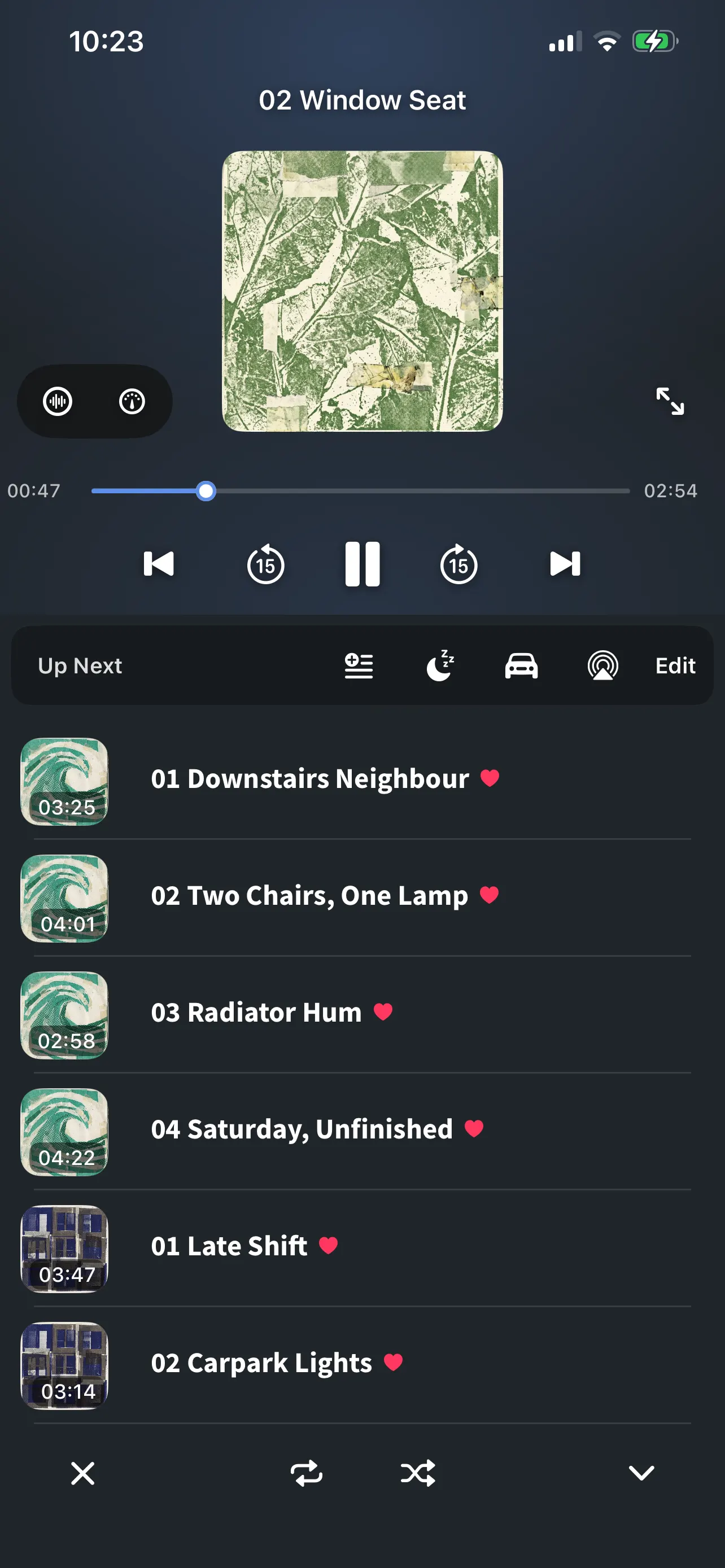
Video and audio share one queue and one set of controls. It keeps playing when you leave the app, and it remembers where you stopped.

Speed
0.5× to 2.0×
Sleep timer
15, 30, 45, 60 min or your own
Zoom
Pinch to 4×, double-tap to 2.5×
Aspect
7 modes, kept per orientation
The FoxFM player: artwork, scrubber, skip buttons and the Up Next queue

It keeps going when you leave

Playback does not stop because you did something else.

  • Audio keeps playing with the screen off and while you use another app
  • Video moves into Picture in Picture when you leave the app, and comes back to the card when you return
  • Lock Screen and Control Center get artwork, play/pause, next and previous, and skip back or forward 15 seconds
  • AirPlay through the system route picker, and a car mode built for a phone on a dashboard

A player you can put down

The floating card is a real window, not a banner.

  • Drag it anywhere: it settles against the left or right edge at the height you left it
  • Pinch it larger or smaller, double-tap for full screen, swipe it aside to tuck it into an edge tab — it carries on playing there
  • Closing it is a deliberate press of ×, so a stray flick never stops the music

The queue is yours

  • Tap to play, swipe to remove, drag to reorder — no edit mode to enter first
  • Files and radio keep separate queues, and one tap switches between them
  • In landscape the queue takes a third of the screen beside the picture
  • Restore on Launch reopens the last queue at the exact position, paused; Play on Launch is a separate switch and is off unless you turn it on

Fit the picture to the screen

  • Pinch to zoom up to 4×, double-tap to jump to 2.5× at the point you touched, then drag to inspect any part of the frame
  • Fit, Fill, Stretch, 4:3, 16:9, 21:9 and Original — remembered separately for portrait and landscape
  • Drag sideways to seek, swipe down or double-tap to minimise, tap to show the controls

Questions

About the player

Does the music keep playing when I lock the phone?

Yes. Audio continues with the screen off and while you are in another app, and the Lock Screen shows the artwork with play, pause, next, previous and 15-second skips.

How fast or slow can playback go?

Between 0.5× and 2.0×, from the speed menu in the player’s utility row. The setting applies to what is playing at the time.

Does it remember where I stopped?

Yes. With Restore on Launch — which is on by default — FoxFM reopens the same queue, the same track and the same position when you come back, paused. Play on Launch is a separate switch if you want it to start playing straight away.

Can I change the shape of the picture?

Yes. The aspect button offers Fit, Fill, Stretch, 4:3, 16:9, 21:9 and Original, and it remembers your choice separately for portrait and landscape. You can also pinch to zoom to 4× and drag to look around the frame.

Get FoxFM for iPhone and iPad.

Free on the App Store · iOS 16 or later