
Browser & downloads

A browser, and a download manager that finishes the job.

Tabs, private browsing and bookmarks, with a transfer list that survives a lost signal, a switched screen and a relaunch.

At a time
Up to 3, your choice
Networks
Wi-Fi only, if you prefer
Interrupted
Pause, resume, retry, verify
Background
Keeps going, and restores
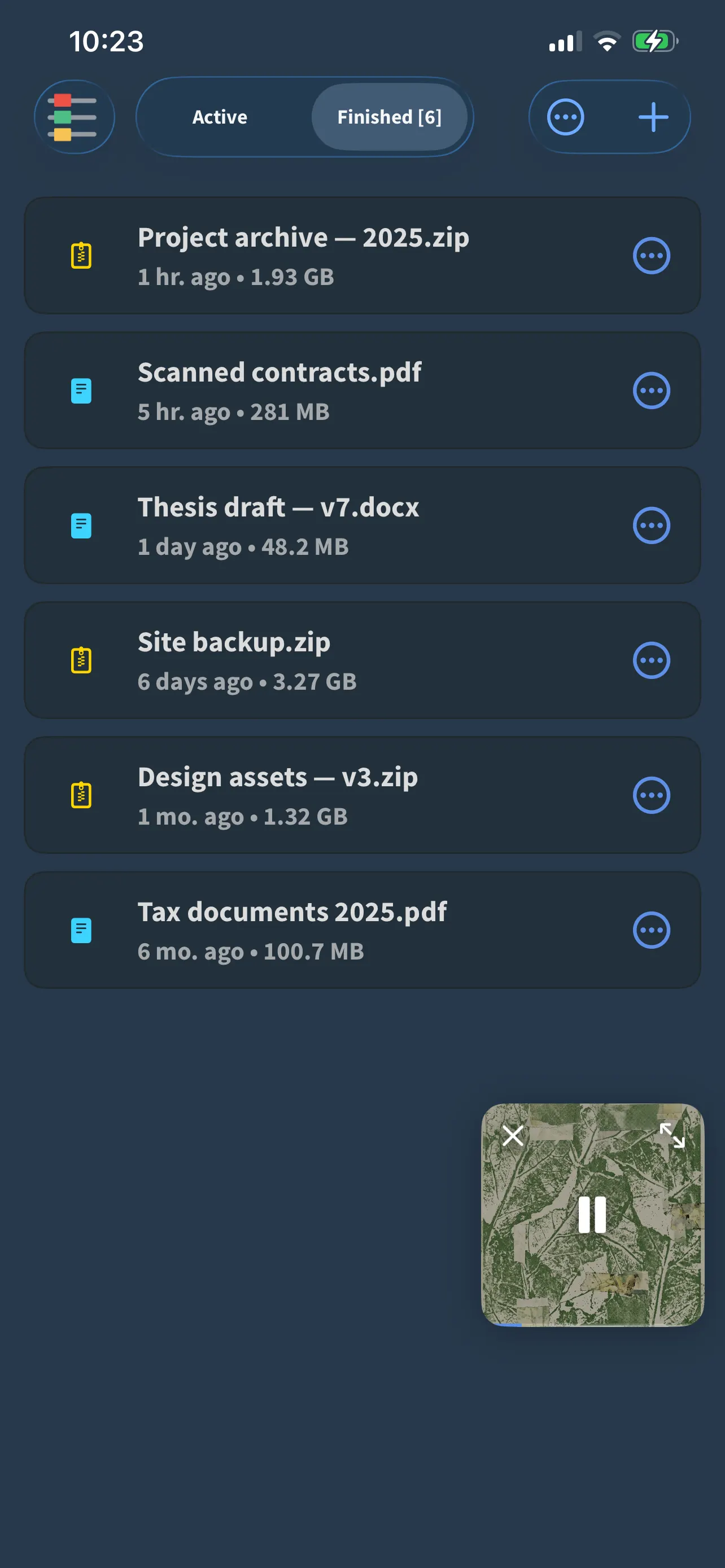
FoxFM’s downloads list showing finished files with their sizes and when they arrived

A browser that behaves

  • Several tabs with a strip you can see at a glance, and private tabs whose cookies are thrown away when you quit
  • Bookmarks in folders, history, and address-bar suggestions from both
  • Ad and popup blocking on by default, with a switch when a page needs it off
  • Find on page, pull to refresh, and desktop mode per tab or as your default

Transfers you can steer

  • Active and finished in two tabs, with progress rings and a status on every row
  • Pause, resume, cancel, retry or verify a single item — or the whole list at once
  • Choose how many run at a time, and whether they wait for Wi-Fi
  • On cellular, a Wi-Fi-only transfer pauses itself and picks up again when you are back on Wi-Fi

It does not lose your place

  • Transfers carry on while you are elsewhere in the app, and while the screen is off
  • Quit the app mid-transfer and it resumes on the next launch
  • What has finished stays in the list, with its thumbnail, size and when it arrived
  • Anything that plays opens in the player; everything else opens in the system preview

Questions

About downloads

Do downloads continue if I leave the app?

Yes. They carry on in the background and are restored if the app is relaunched, so a long transfer does not start again from the beginning.

Can I stop downloads eating my data?

Yes. Turn on Wi-Fi only in Download Options: a transfer on cellular pauses itself and resumes when you are back on Wi-Fi.

How many downloads run at once?

Up to three by default, and you can change the number in Download Options.

Does the browser block ads?

Ad and popup blocking is on by default, and there is a switch to turn it off for a page that needs it.

Get FoxFM for iPhone and iPad.

Free on the App Store · iOS 16 or later